
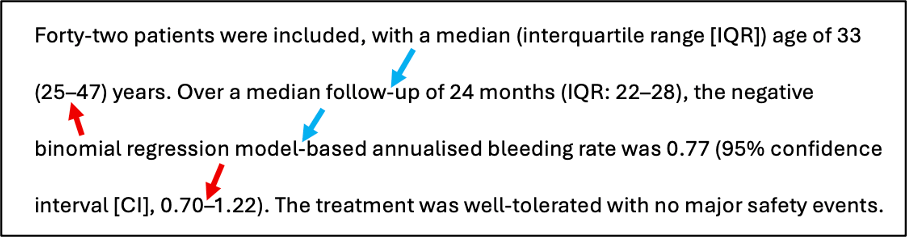
“I find it a major concern that throughout this manuscript”, wrote the reviewer, “there are stylistic patterns and phrasing which are characteristic of AI-generated text. This is exemplified by using different types of “-“ in parts of the Abstract (screenshot above).”
The words are paraphrased and the screenshot above is a fictionalised recreation of the supplied one, but the review was real – like many scientists nowadays, the reviewer was clearly concerned at what appeared to be the unacknowledged use of AI to write large chunks of text.
The problem? The text was 100% human-generated, and the different dashes that the reviewer highlighted were in fact being used correctly.
Prior to the arrival of large language models (LLMs) and generative AI (genAI), most people had probably never heard of the em-dash. But the propensity of AIs to use this particular punctuation mark has now made everyone interpret the em-dash as a kind of AI watermark, and awareness of that propensity – without necessarily knowing what an em-dash looks like (spoiler: you’re yet to see one in this posting so far!) – has made some start to suspect AI involvement where there is none.
I myself was unaware of the difference between hyphens, en dashes and em dashes until fairly recently. I had noticed that Word did some funny autoformatting thing if I hit dash and then space where it produced a longer dash, but I didn’t know that this longer dash had its own name, nor did I know how it was supposed to be used.
My arrival in MedComms and getting trained in Good Publication Practice was the event that introduced me to a whole dimension of punctuation that had been hiding right in front of my eyes. And it’s one of those things that might seem fussy and pedantic at first, but really enriches a text once you’ve learned to use it properly.
So what is the em dash, and how does it relate to other dashes?
| Symbol | Name | Etymology | Use | Example |
| – | Hyphen | From Ancient Greek | Joining words | A 26-year-old patient |
| – | En-dash | As long as the letter n | Indicating ranges | 18–29 years |
| — | Em-dash | As long as the letter m | Demarcating subclauses | Here—and only here—is a thing. |
| Total Internal Reflection (2026) | ||||
Hyphen
Found as a standard character on keyboards, and frequently misapplied as a result. The hyphen should be used for joining two (or more) words, as in the example above. It’s also well worth learning to use the non-breaking hyphen (Insert>Symbol>Special characters) which ensures that the hyphen is not left unattached at the end of a line (Word also has a non-breaking space, which is equally useful for stopping numerals and units from getting separated). The hyphen is not supposed to indicate ranges, nor should it demarcate subclauses.
Fun fact: the hyphen (-) is also not the same as a minus (−), because a minus sign is supposed to be at the same height as the crossbar on the plus (-+ compared with −+). This is an even easier mistake to make, because the hyphen confusingly sits next to the plus sign on the keyboard.
En-dash
Probably the most useful of the non-keyboard dashes, and well worth setting up as a keyboard shortcut. The en-dash (–) takes its name from its length (same as the letter “n”), and its main function is for indicating ranges. Any time you’re writing “From X to Y” you can use an en-dash, such as “18–29 years”, “January–December”, or “pages 78–97”.
Em-dash
Beloved of AIs, the em-dash (—) is the longest of the lot, and gets used to indicate a subclause, often as an alternative to parentheses. For example, “The em-dash—which is the longest dash of all—is used like so.”
Where it gets confusing (and more detailed)
The en-dash can also be used to demarcate subclauses! If used in this way, it should have a space on either side, which is why Word autocorrects the hyphen in a “hyphen-space-letter” sequence into an en-dash: it assumes you’re preparing a subclause. In a nutshell: you can avoid the em-dash completely and just use en-dashes instead, then gently correct any reviewer who thinks they’ve spotted an em-dash and is taking it as a sign of AI involvement. ;-p
What’s also confusing is that because the en-dash and em-dash are operationally defined according to letter widths, their actual length varies from font to font (infamously, in Lucida Grande the en-dash is actually shorter than the hyphen!).
Further reading
If you’re interested, it’s well worth consulting the Wikipedia pages on the dash, the hyphen, and the minus sign for longer and more detailed (and more nuanced) descriptions of the fascinating differences between these punctuation marks. What’s above is undoubtedly a simplification, but a practical one.
A lot of this confusion comes about because a keyboard is ultimately just a way of reflecting the wonderful variety that occurs in (hand)written text, and there are many things we do when handwriting that we can’t readily replicate when using a keyboard – we’d all automatically use a longer dash (i.e. an en-dash or an em-dash) for demarcating a subclause, but the way that en-dashes and em-dashes are ever so slightly hidden in Word means that it’s easy to end up using a hyphen instead. In a similar vein, many people would naturally write a decimal point about halfway up a numeral, but resort to using a full stop (period mark) on a keyboard – there’s actually a punctuation mark called the midline decimal that replicates the handwritten version more nicely – compare 9.14 with 9·14. But let’s stop now before we go further down the typography rabbit hole…
Acknowledgement
The title of this posting is taken from the schoolyard mnemonic for remembering the (British) spelling of diarrhoea – dashing in a rush, rushing hard, or else accident. ;-p

